BACnet MSTP Settings
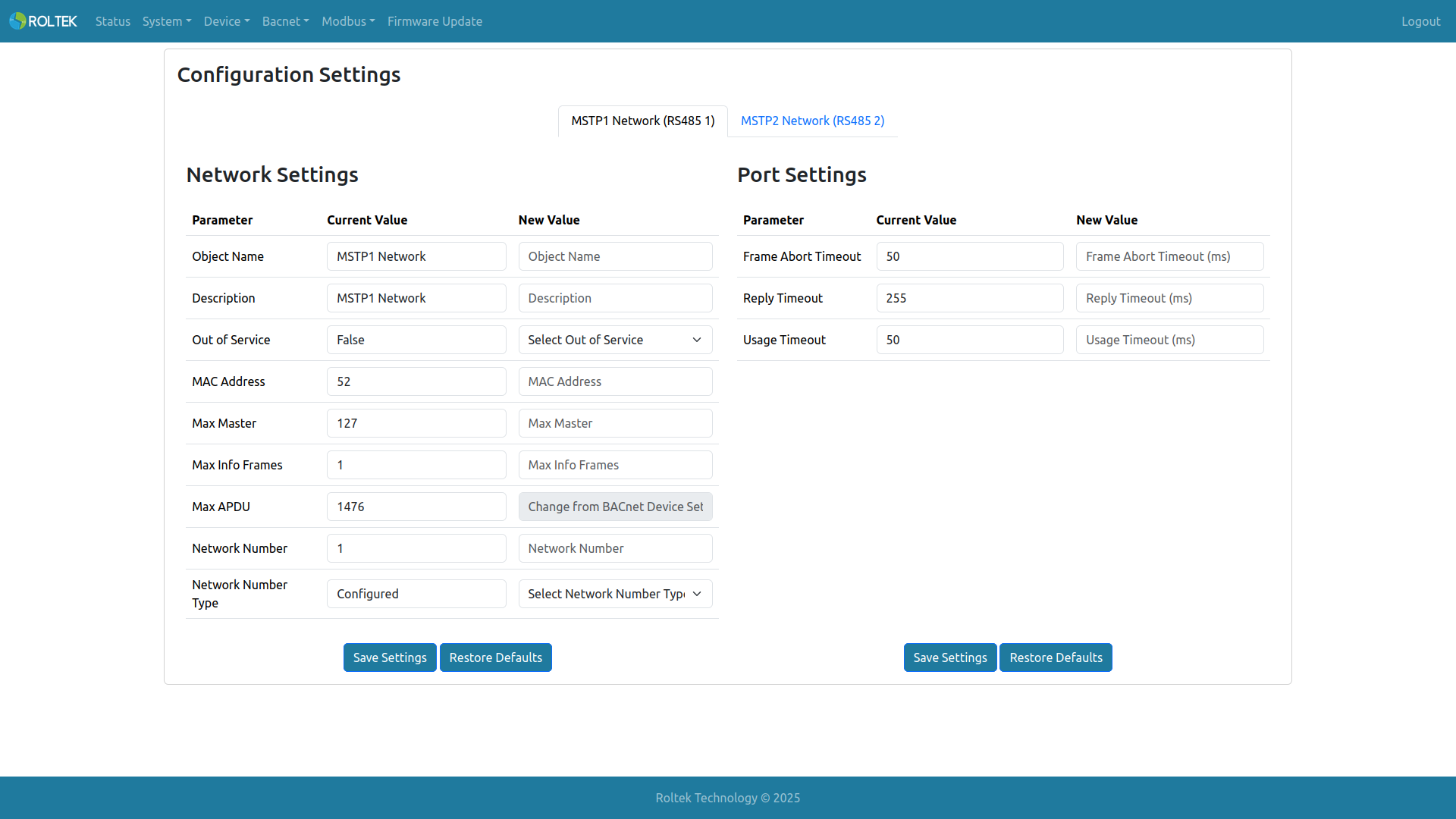
Here, the device's MS/TP settings can be configured. Tab 1 is for MSTP 1 (RS485 1); tab 2 is for MSTP 2 (RS485 2). Configuration Settings are divided into two sections: Network Settings and Port Settings. Network Settings are used for MS/TP network configurations; Port Settings are used for MS/TP timing configurations. Each settings group has its own Save Settings and Restore Defaults buttons. These buttons update the configurations for both MSTP 1 and MSTP 2.
Network Settings
- Object Name: The object name property of the BACnet object (BACnet Network Port Object). The allowed length is 1-31. Only uppercase letters, lowercase letters, digits 0-9, space, comma, and period can be used.
- Description: The description property of the BACnet object. The allowed length is 1-31. Only uppercase letters, lowercase letters, digits 0-9, space, comma, and period can be used.
- Out of Service: The out of service property of the BACnet object. False: The Network Port starts BACnet communication. True: The Network Port stops BACnet communication.
- MAC Address: The MAC Address property of the BACnet object. The valid range is 1 - 127.
- Max Master: The Max Master property of the BACnet object. The valid range is 1 - 127.
- Max Info Frames: The Max Info Frames property of the BACnet object. The valid range is 1 - 4.
- Max APDU: The maximum APDU length of the BACnet object. It needs to be changed from the BACnet Device Settings menu.
- Network Number: The network number of the BACnet object. The range is between 1 - 65534. It must not be used by another network port.
- Network Number Type: The Network Number Type property of the BACnet object. Learned: The DC620 DUAL BACnet IoT Gateway learns the network number for that port over the network. Configured: The DC620 DUAL BACnet IoT Gateway uses the configured network number for that port.
Port Settings
- Frame Abort Timeout: The frame abort timeout value of the MS/TP port. It can take any value between 10 ms and 100 ms.
- Reply Timeout: The reply timeout value of the MS/TP port. It can take any value between 255 ms and 300 ms.
- Usage Timeout: The usage timeout value of the MS/TP port. It can take any value between 20 ms and 100 ms.