Modbus Settings
Follow the Settings and Modbus tabs. On this page, the user can configure the Modbus settings.
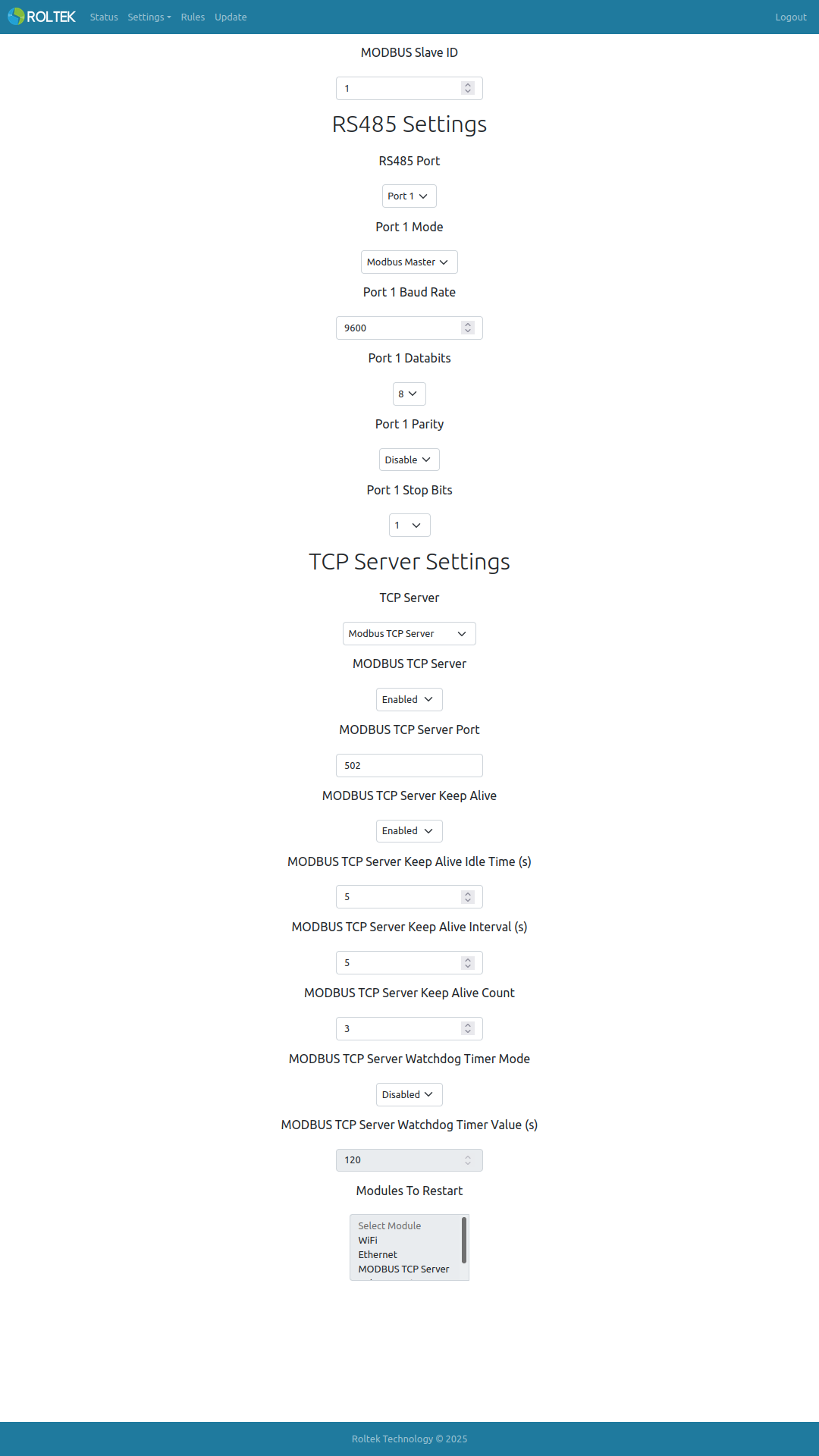
| Parameter | Description | Values |
|---|---|---|
| Modbus RTU Slave ID | The Slave ID of the device. | |
| RS485 Port | The RS485 Port to be configured. | Port 1: Settings under the RS485 Settings header will be configured for Port 1.
Port 2: Settings under the RS485 Settings header will be configured for Port 2. |
| Modbus Mode | The Modbus mode of the device. | Master: The device will operate as Modbus RTU and Modbus TCP Master.
Slave: The device will operate as Modbus RTU and Modbus TCP Slave. |
| Modbus RTU Baud Rate | The Baud rate of the RTU connection. | 300, 600, 1200, 2400, 4800, 9600, 19200, 83400, 57600, 115200 |
| Modbus RTU Databits | The number of RTU data bits. | 5, 6, 7, 8 |
| Modbus RTU Parity | The parity bit of the RTU. | Odd, Even, None |
| Modbus RTU Stop Bits | The stop bit of the RTU transmission. | 1, 1.5, 2 |
| Modbus TCP Server | Enable or disable the Modbus TCP to RTU gateway. | |
| Modbus TCP Server Port | The port number of the Modbus TCP to RTU gateway. | |
| Modbus TCP Server Keep Alive | Enable or disable the keep alive feature on the Modbus TCP to RTU gateway. | |
| Modbus TCP Server Keep Alive Idle Time | The waiting time for the keep alive message from the client on the Modbus TCP - RTU gateway. If the Modbus TCP Server Keep Alive Interval and Modbus TCP Server Keep Alive Count values are equal to zero, the gateway waits for the Modbus TCP Server Keep Alive Idle Time duration to expire, and if no keep alive message or data is received from the client, the gateway closes the connection. If the Modbus TCP Server Keep Alive Interval and Modbus TCP Server Keep Alive Count values are non-zero, the gateway waits for the Modbus TCP Server Keep Alive Idle Time duration to expire, and if no keep alive message or data is received from the client, the gateway waits for the Modbus TCP Server Keep Alive Count number of Modbus TCP Server Keep Alive Interval durations to expire before closing the connection. | |
| Modbus TCP Server Keep Alive Interval | ||
| Modbus TCP Server Keep Alive Count | ||
| Modbus TCP Server Watchdog Timer Mode | Enable or disable the Modbus TCP Server watchdog timer. This watchdog timer is triggered if a client cannot connect to the Modbus TCP Server within the specified time. | Enabled Disabled |
| Modbus TCP Server Watchdog Timer Value | The duration of the Modbus TCP Server watchdog timer. The unit is seconds. | 120 |
| Modules To Restart | The modules to be restarted when the Modbus TCP Server watchdog timer is triggered. Multiple selections can be made. | - Wi-Fi - Ethernet - Modbus TCP Server - Reboot Device |