Wi-Fi Settings
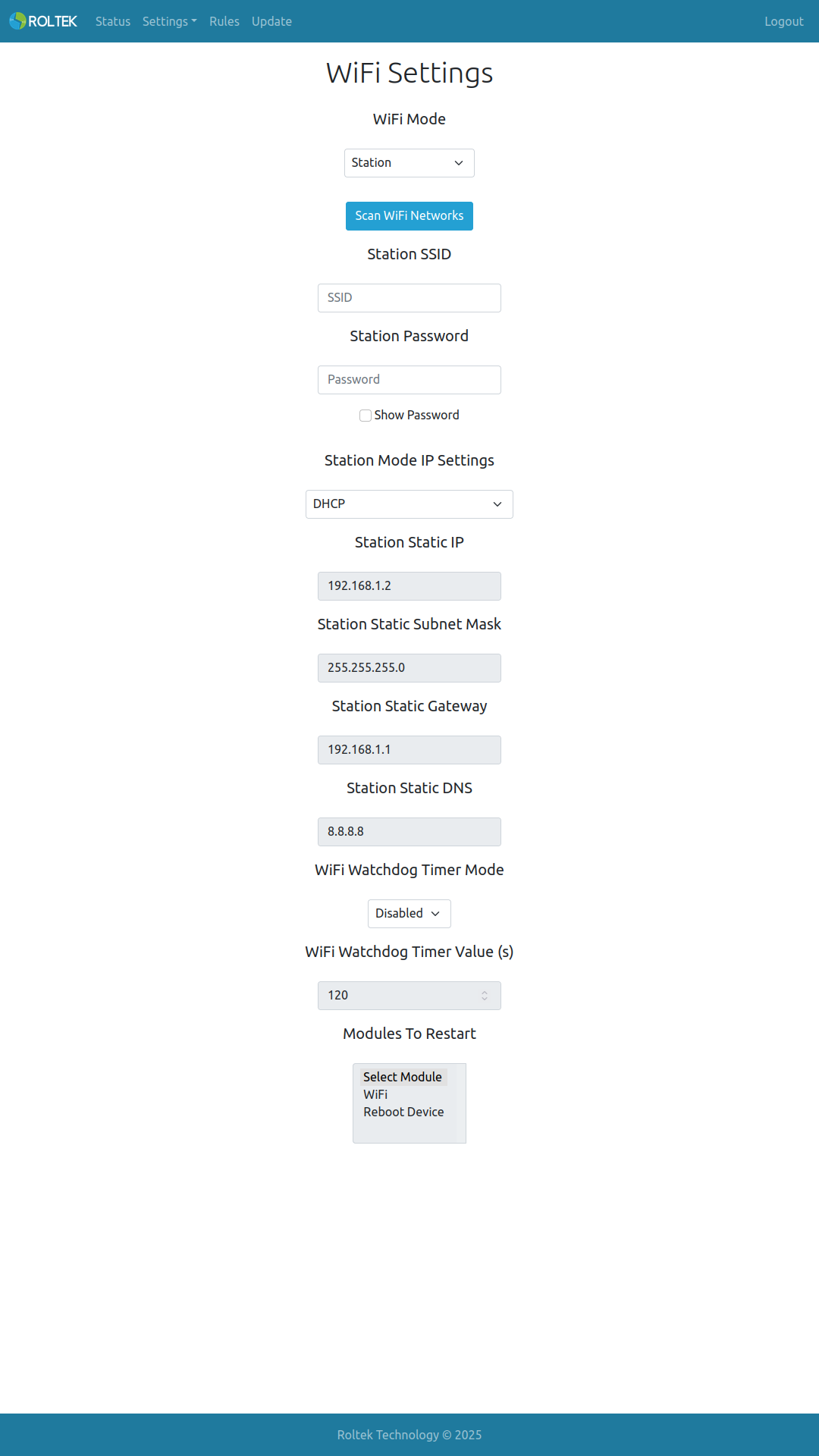
Follow the Settings and WiFi tabs. On this page, the user can configure the Wi-Fi settings. The user can disable Wi-Fi or select the Wi-Fi mode as Access Point or Station.
If the Station mode is selected, the device will attempt to connect to the AP using the provided SSID and password. The user can directly connect their device by entering the SSID and password of the AP they want to connect to or can press the Scan WiFi Network button to select which AP they want the device to connect to. The user can choose the IP mode as DHCP or Static. If DHCP is selected, an IP will be assigned to the device from the AP. If Static is selected, the user must enter the Static IP, Subnet Mask, and Gateway IP themselves.
In Station mode, the device will attempt to connect to the AP using the provided SSID and password. During this connection phase, the device will continue to operate as its own AP, and the user can connect to the device's own AP. Once the device connects to the AP with the given SSID and password, it will turn off its own AP.
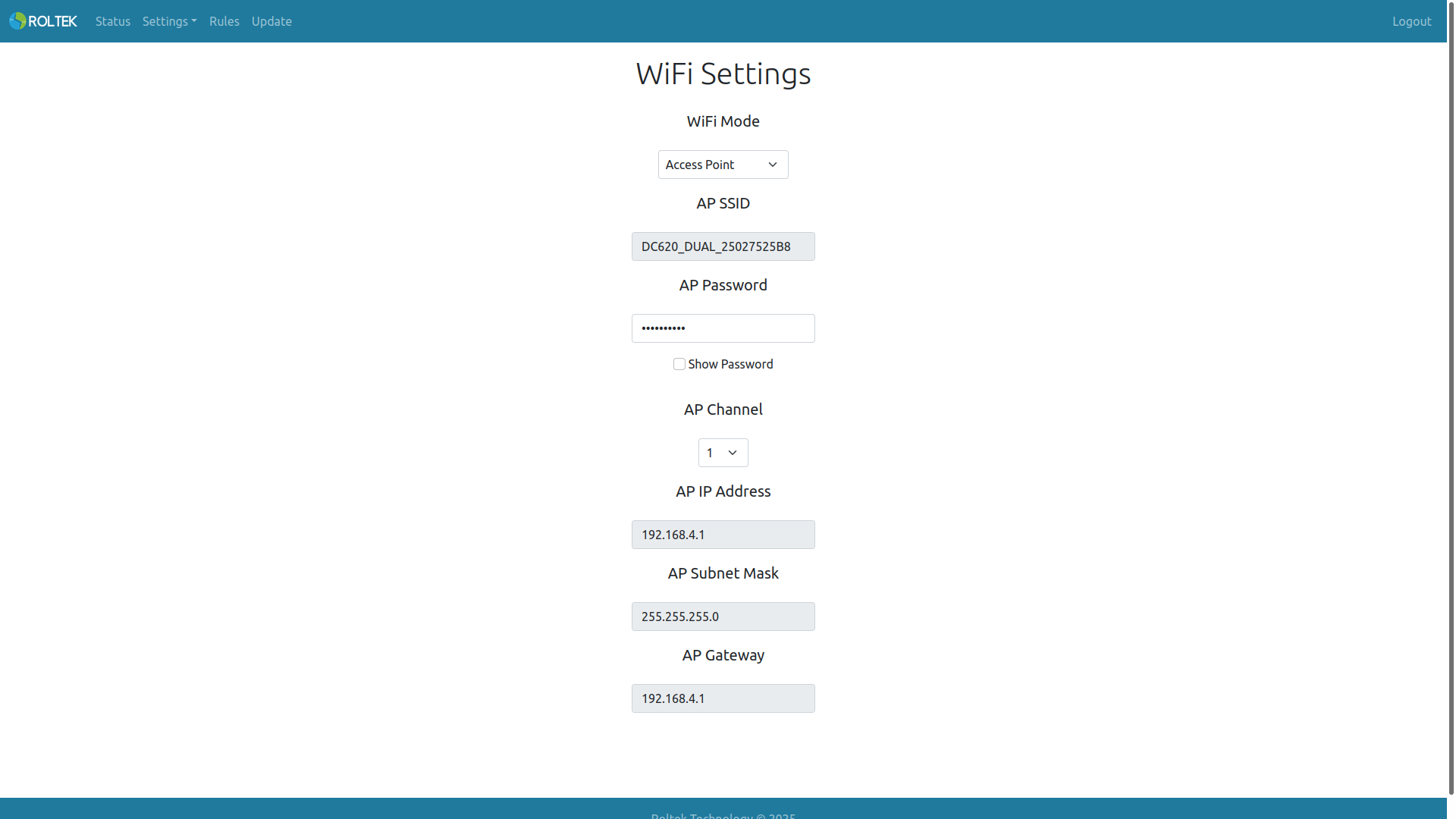
If the Access Point mode is selected, the device will operate as an Access Point.
| Parameter | Description | Values |
|---|---|---|
| Wi-Fi Mode | Wi-Fi Mode. | - Disabled - Access Point - Station |
| Station SSID | SSID of the AP that the Station will connect to. | |
| Station Password | Password of the AP that the Station will connect to. | |
| Station Mode IP Settings | Station IP operating mode. | - DHCP - Static |
| Station Static IP Address | Station static IP address. | |
| Station Static Subnet Mask | Station static Subnet Mask. | |
| Station Static Gateway | Station static Gateway address. | |
| Station Static DNS | Station static DNS address. | |
| WiFi Watchdog Timer Mode | Enable or disable the WiFi watchdog timer. This watchdog timer operates when the device is in station mode and is triggered if the device cannot connect to the registered station within the specified time. | Enabled Disabled |
| WiFi Watchdog Timer Value | WiFi watchdog timer duration. The unit is seconds. | 120 |
| Modules To Restart | Modules to be restarted when the WiFi watchdog timer is triggered. Multiple selections can be made. | - WiFi - Reboot Device |
| AP SSID | Access Point SSID. | DC620_DUAL-XXXXXXXXXX (XXXXXXXXXX serial number, cannot be changed) |
| AP Password | Access Point password. The default value is the device's serial number. | Device Serial Number |
| AP Channel | Access Point channel. The default value is 1. | 1 - 13 |
| AP IP Address | Access Point IP address. | 192.168.4.1 (Cannot be changed) |
| AP Subnet Mask | Access Point Subnet Mask. | 255.255.255.0 (Cannot be changed) |
| AP Gateway | Access Point Gateway address. | 192.168.4.1 (Cannot be changed) |