RF Settings
Follow the Settings and RF tabs. On this page, the user can configure the RF settings of the device.
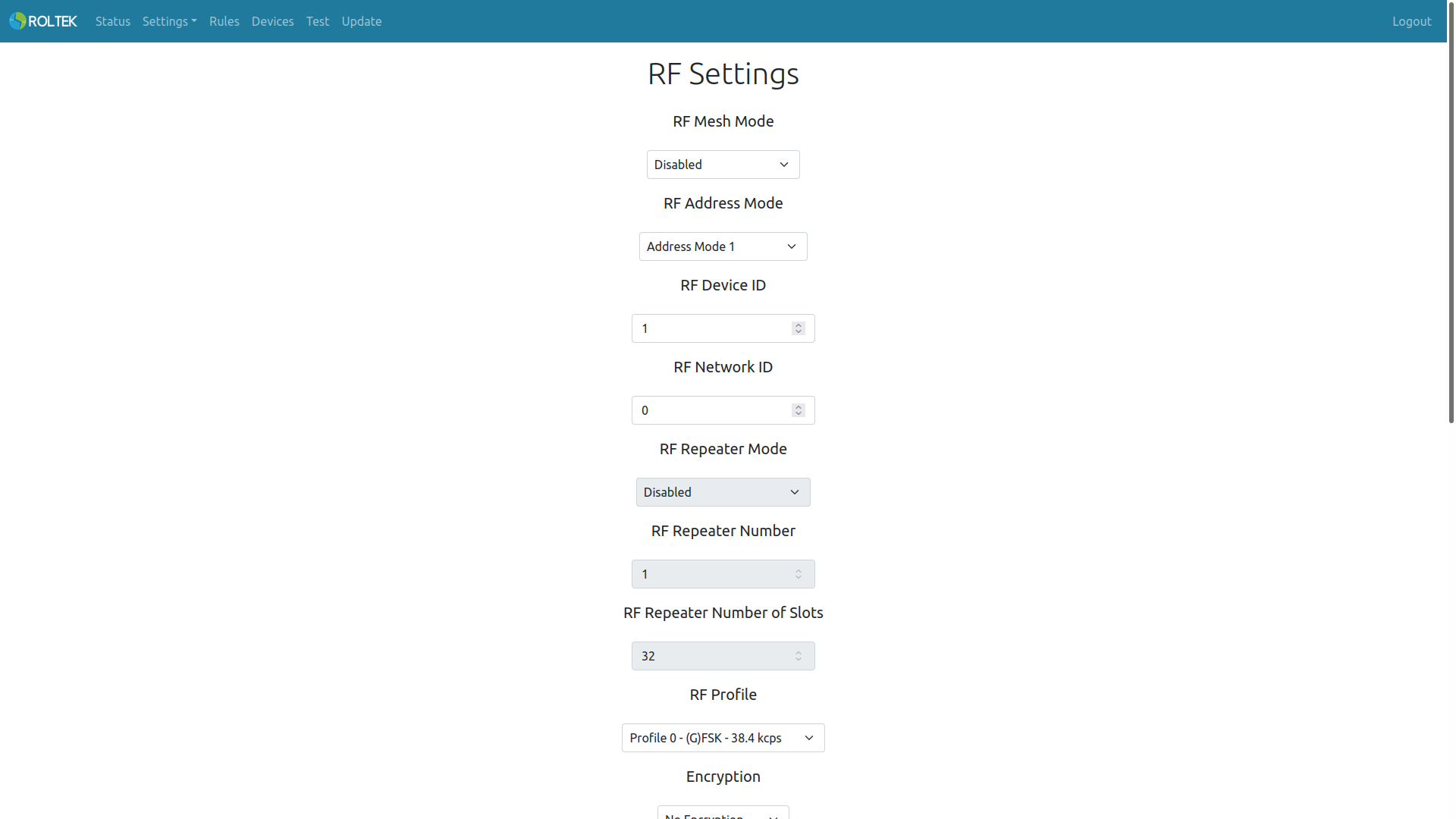
| Parameter | Description | Values |
|---|---|---|
| RF Mesh Mode | Enable or disable RF Mesh mode. | Enabled Disabled |
| RF Address Mode | RF Address mode | Address Mode 0: In this mode, the device broadcasts all packets to other ModProBus devices in the network.
Address Mode 1: In this mode, the device can broadcast to all ModProBus devices in the network or send to a specific ModProBus device specified in the network. Address Mode 2: In this mode, the device can broadcast to ModProBus devices in other networks or send to a specific ModProBus device specified in the specified network. |
| RF Device ID | The RF device ID of the device. Each device's ID must be unique. | 1-254 |
| RF Network ID | The RF network ID of the device. The ID must be the same for devices in the same network. | 0-254 |
| RF Repeater Mode | If enabled, this device will repeat all messages that do not come with its own RF Device ID and all broadcast messages. | Enabled Disabled |
| RF Repeater Number | The total number of Repeaters in the network. The number must be the same for devices in the same network. As the number increases, the maximum transmission time and packet collision will increase. | 0-255 |
| RF Repeater Number of Slots | This is the total number of repeater slots in the same frequency channel. The number must be the same for devices in the same network. When multiple repeater devices are used in a single network, if all repeater devices send the received packet at the same time, the repeated data packets may collide in the frequency channel. To prevent this, the frequency channel is divided by the RF Repeater Number of Slots, and each repeater randomly selects a specific segment. This value must be greater than the RF Repeater Number value; otherwise, data packets will collide. As the RF Repeater Number of Slots value increases, the maximum transmission time will increase. | 1-255 |
| RF Profile | The operating profile of the device. | Profile 0 Profile 2 Profile 4 Profile 7 |
| Encryption | Data encryption. | No Encryption AES 256 |
| Frequency | The frequency at which the device operates. | 869.45 MHz 869.50 MHz 869.55 MHz 869.60 MHz |
| Power | The output power of the device. | 12 dBm 18 dBm 21 dBm 23 dBm 24 dBm 25 dBm 26 dBm |
| RF TX Timeout | The timeout duration for the transmitted RF message (milliseconds). | |
| RF RX Timeout | The timeout duration for the received RF message (milliseconds). | |
| RF Watchdog Timer Mode | RF Watchdog timer mode. Triggered when RF communication does not occur until the timeout duration. | Enabled Disabled |
| RF Watchdog Timer Value | RF Watchdog timer value (seconds). | |
| Modules to Restart | Modules that the watchdog timer will restart. | - RF - Reboot Device |
- All ModProBus devices in the same network must be configured with the same mesh mode.
- All ModProBus devices in the same network must be configured with the same Address Mode.
- Address Mode 1 and Address Mode 2 can only be used when mesh mode is enabled.
- Users should consider that as the number of repeaters increases, the probability of packet collision and maximum transmission time increases.
- Users should consider that as the number of repeater slots increases, the maximum transmission time increases.
- Profile 4 has the lowest data rate and the longest range. Profile 2 has the highest data rate and the shortest range.
- Profile 4 can only be used when mesh mode is disabled.
- All ModProBus devices in the same network must be configured with the same frequency.
- When using mesh mode, RF RX timeout must be more than twice the maximum transmission time value.