IEC 62056-21 Settings
Follow the Settings and IEC 62056-21 tabs. This page allows you to configure the IEC 62056-21 settings.
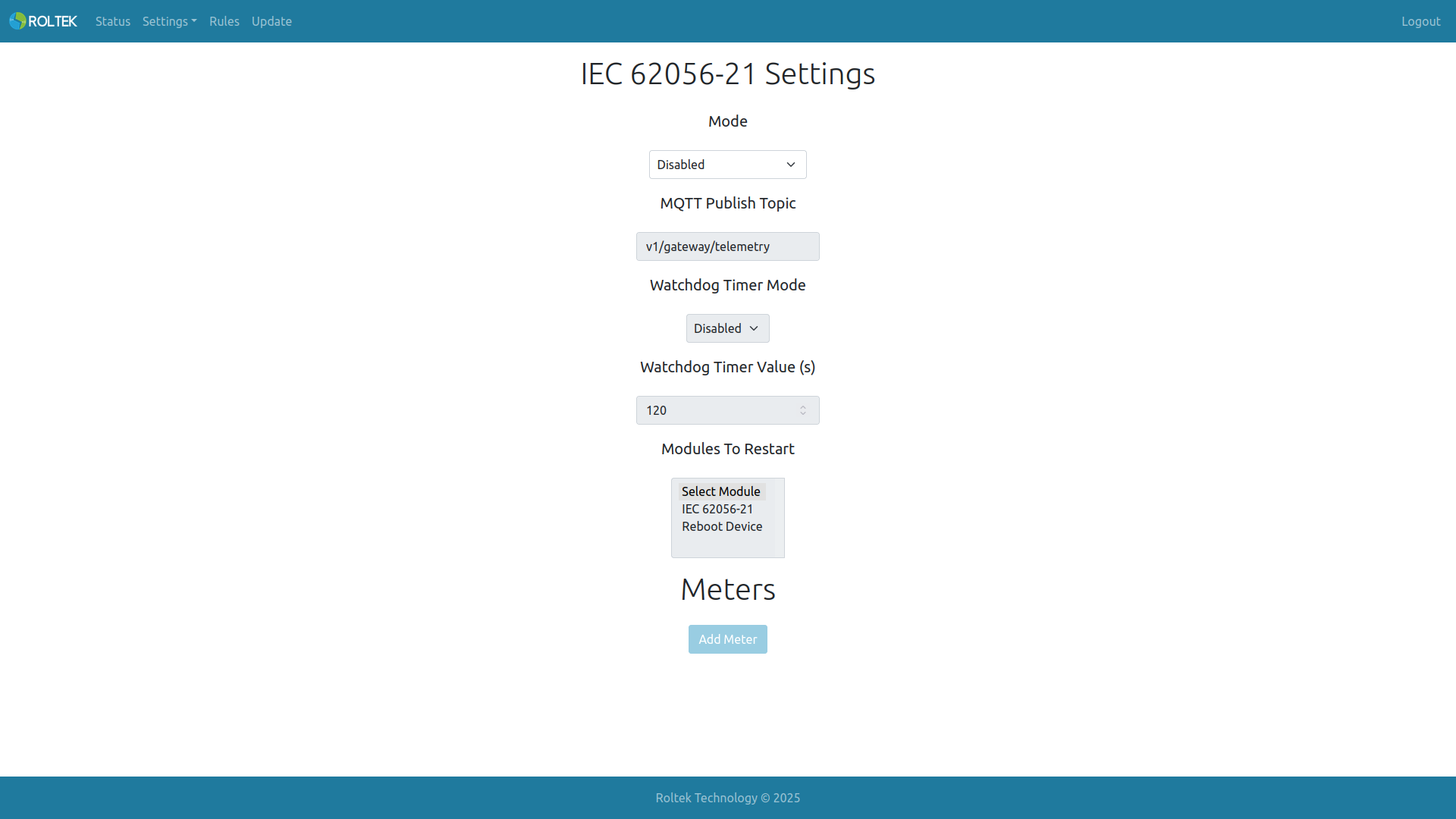
| Parameter | Description | Values |
|---|---|---|
| Mode | IEC 62056-21 can be enabled or disabled. When enabled, the RS485 port cannot be used for Modbus RTU. | Enabled Disabled |
| MQTT Publish Topic | The MQTT topic for sending meter data to the MQTT broker. Note: If meter data is to be sent to the MQTT broker, MQTT Gateway Mode must be selected in the MQTT Settings section. | |
| Watchdog Timer Mode | Enable or disable the IEC62056-21 watchdog timer. It is triggered if a reading cannot be made from the meter within the specified time. | Enabled Disabled |
| Watchdog Timer Value | IEC62056-21 watchdog timer duration (seconds). | 120 |
| Modules To Restart | Modules to be restarted when the watchdog is triggered. Multiple selections can be made. | IEC62056-21 Reboot Device |
Adding Meter
A new meter can be added with the Add Meter button.
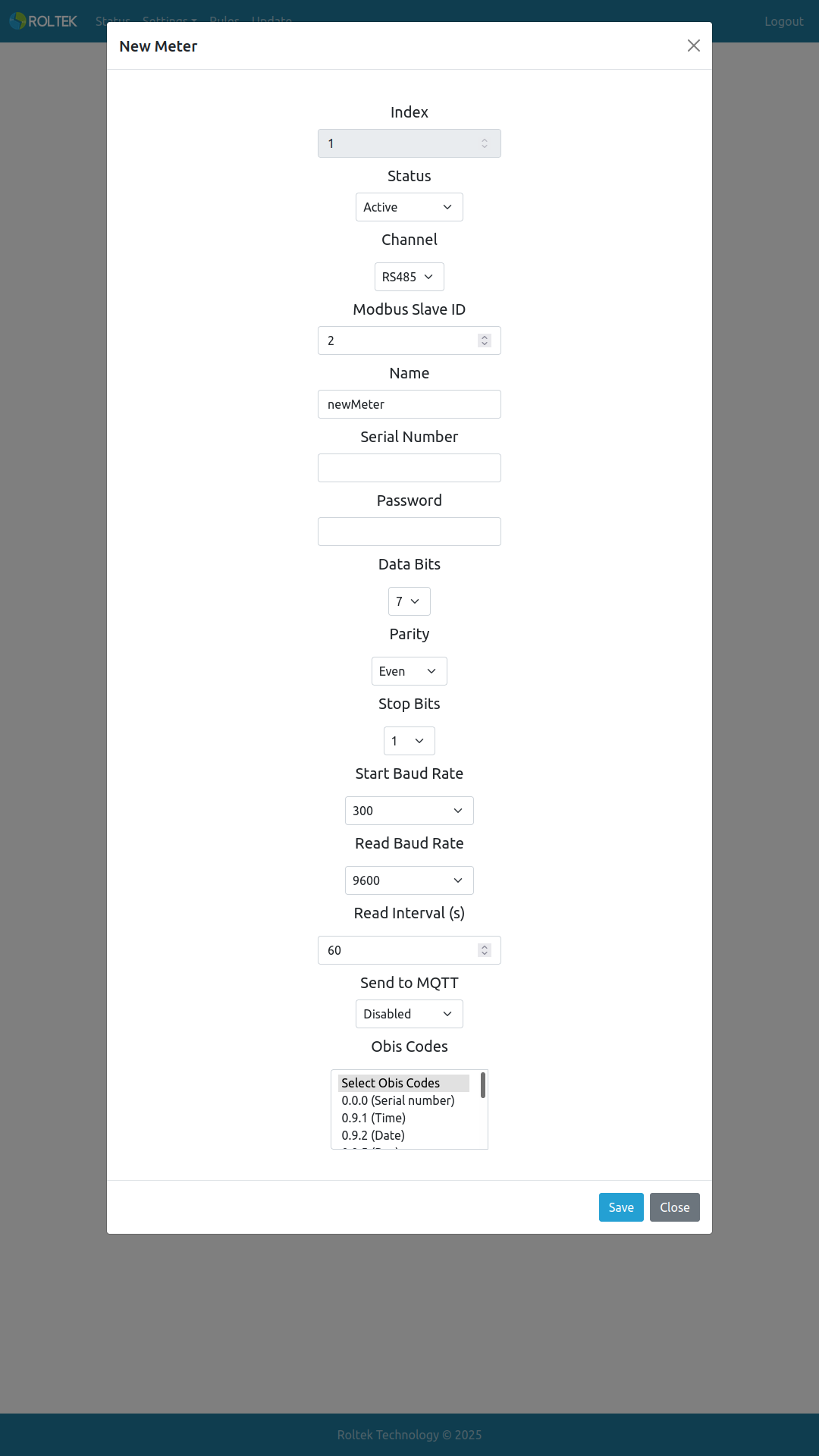
| Parameter | Description | Values |
|---|---|---|
| Status | The status of the meter, active or passive. | Active Passive |
| Modbus Slave ID | Creates a virtual Modbus Slave ID and registers for each meter. Data can be accessed via Modbus TCP Server or sent to the MQTT Broker. The Slave ID must be unique and different from the device's own Slave ID. | 0 - 254 |
| Name | The name of the meter. Used when sending data to the MQTT Broker. | Max. 15 characters |
| Serial Number | The serial number of the meter. Required for multiple meters. | Max. 31 characters |
| Data Bits | Data bit length. | 5 - 8 |
| Parity | Enable or disable the parity bit. | Enabled Disabled |
| Stop Bits | The stop bit of the message. | 1 1.5 2 |
| Start Baud Rate | The initial baud rate of the IEC 62056-21 connection. | 300 - 115200 bps |
| Read Baud Rate | The read baud rate of the IEC 62056-21 connection. | 300 - 115200 bps |
| Send to MQTT | Sends meter data to the MQTT Broker. Note: MQTT Gateway Mode must be selected in the MQTT Settings section. | Enabled Disabled |
| Obis Codes | Obis codes to be read from the meter. Multiple selections can be made. | 0.0.0 (Serial number) |
| 0.9.1 (Time) | ||
| 0.9.2 (Date) | ||
| 0.9.5 (Day) | ||
| 1.6.0 (Demand) | ||
| 1.8.0 (T) | ||
| 1.8.1 (T1) | ||
| 1.8.2 (T2) | ||
| 1.8.3 (T3) | ||
| 1.8.4 (T4) | ||
| 5.8.0 (Ri) | ||
| 8.8.0 (Rc) | ||
| 31.7.0 (Ir) | ||
| 32.7.0 (Vr) | ||
| 33.7.0 (Cosr) | ||
| 51.7.0 (Is) | ||
| 52.7.0 (Vs) | ||
| 53.7.0 (Coss) | ||
| 71.7.0 (It) | ||
| 72.7.0 (Vt) | ||
| 73.7.0 (Cost) | ||
| 34.7.0 (Freq_r) | ||
| 54.7.0 (Freq_s) | ||
| 74.7.0 (Freq_t) |