Device Connection
There are two connection ports at the bottom of the device:
- The USB Type-C port allows the user to configure the device via a computer.
- The main data transmission interface is connected via an 8-pin M12 cable.
WARNING: The RS485 port will not work when both USB and RS485 are connected at the same time!
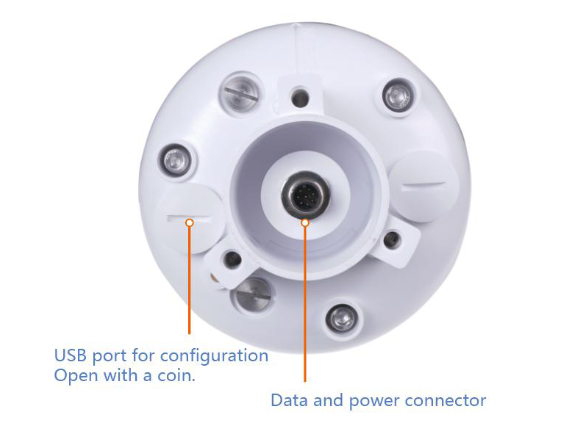
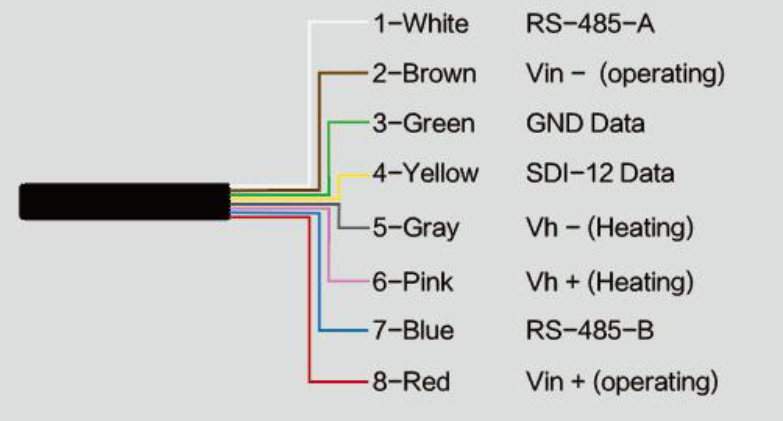
When the cable is connected to the M12 connector, the holes on it must be aligned with the pins on the device connector. The cable must be inserted and then turned clockwise.
When using the heating function of the device, a separate 24V (24V 1A) power supply must be used.
- If the device requires an extension cable for power and the length exceeds 100 meters, a 24V/2A power supply should be used (heating function externally).
- If the heating function is activated, the power supply for the heating module must be close to the device, within 3 meters.
- In case different pin names are used for the RS485 terminal: data+ pin corresponds to A, and data- pin corresponds to B.