Port Forwarding
Port Forwarding
To add a port forwarding rule:
- Follow the Firewall
- Port Forwards
menus. Port forwarding rules can assign a specific port number of the WAN network to a device belonging to the selected internal network.
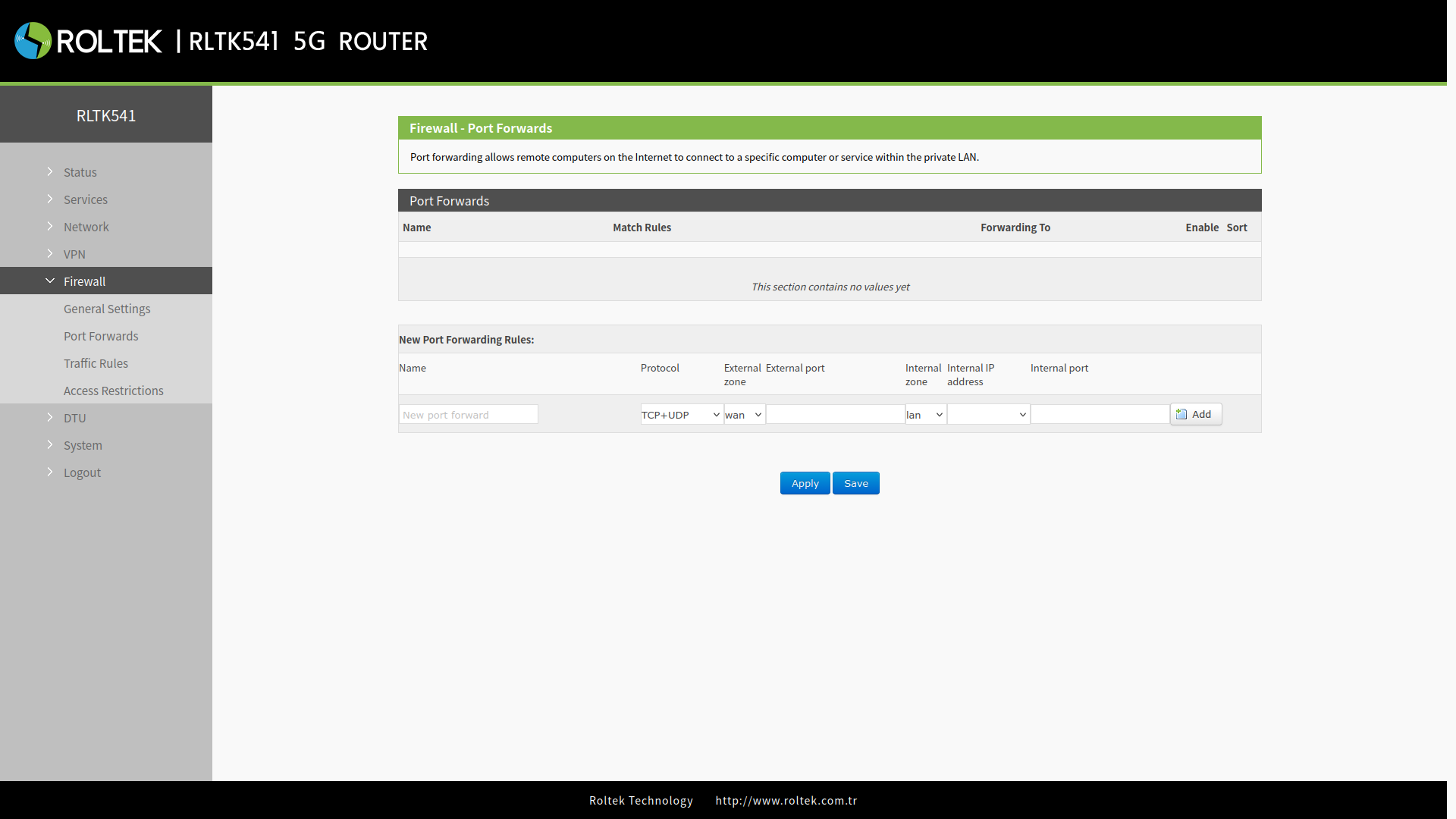
| Parameter | Description | Default Value |
|---|---|---|
| Name | Name of the Rule | None |
| Protocol | TCP+UDP/TCP/UDP | TCP+UDP |
| External zone | wan, vpn | wan |
| External Port | This can be a port or a range of ports, for example, 8000-9000. When both external and internal ports are empty, this indicates a DMZ (Demilitarized Zone) function. | Null |
| Internal Zone | lan, vpn | lan |
| Internal IP address | IP address of the device | Null |
| Internal Port | This can be a port or a range of ports, for example, 8000-9000. When both external and internal ports are empty, this indicates a DMZ (Demilitarized Zone) function. | Null |
DMZ
While port forwarding rules direct a specified WAN port to an internal network device, DMZ (Demilitarized Zone) rules direct all ports belonging to the WAN interface to an internal network device. DMZ rules are set in the port forwarding interface, and in DMZ mode, there is no need to set external and internal ports.
- Port forwarding and DMZ cannot be used simultaneously.