Traffic Rules
To set the device's traffic rules:
- Firewall
- Traffic Rules
follow the menus.
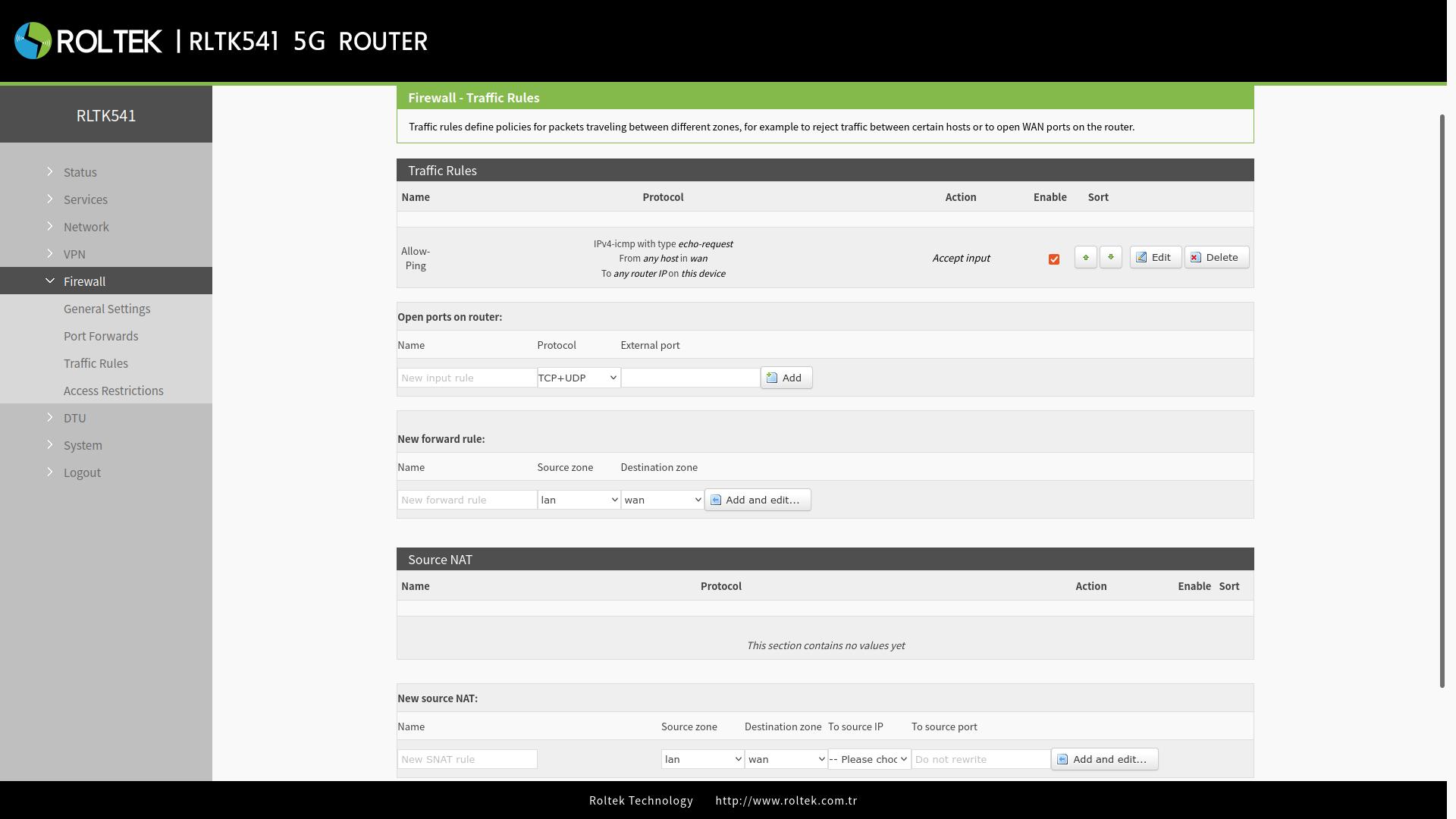
Traffic rules are an important feature of the firewall and allow you to set rules to filter and control the network traffic passing through the device. Essentially, traffic rules determine which traffic rules will be applied to the packets traversing the network. These packets can be allowed, blocked, or rejected based on various criteria such as source and destination IP addresses and port numbers specified in the packet headers.
After making your settings, save your changes with the Save and Apply buttons.
Opening Ports on the Router
It allows you to quickly and easily open ports on the router. You can fill in the relevant fields in the Open ports on router section under the Traffic Rules tab and click the Add button to add a rule.
| Parameter | Description | Default Value |
|---|---|---|
| Name | The name of the rule, defined by the user. | None |
| Protocol | Specifies which protocols the rule will apply to; includes TCP+UDP, TCP, UDP. | TCP+UDP |
| External port | Specifies which port(s) will be opened. | None |
Port Forwarding
Routing rules are made here. You can set a rule by clicking the Add and edit... button in the New forward rule section under the Traffic Rules tab.
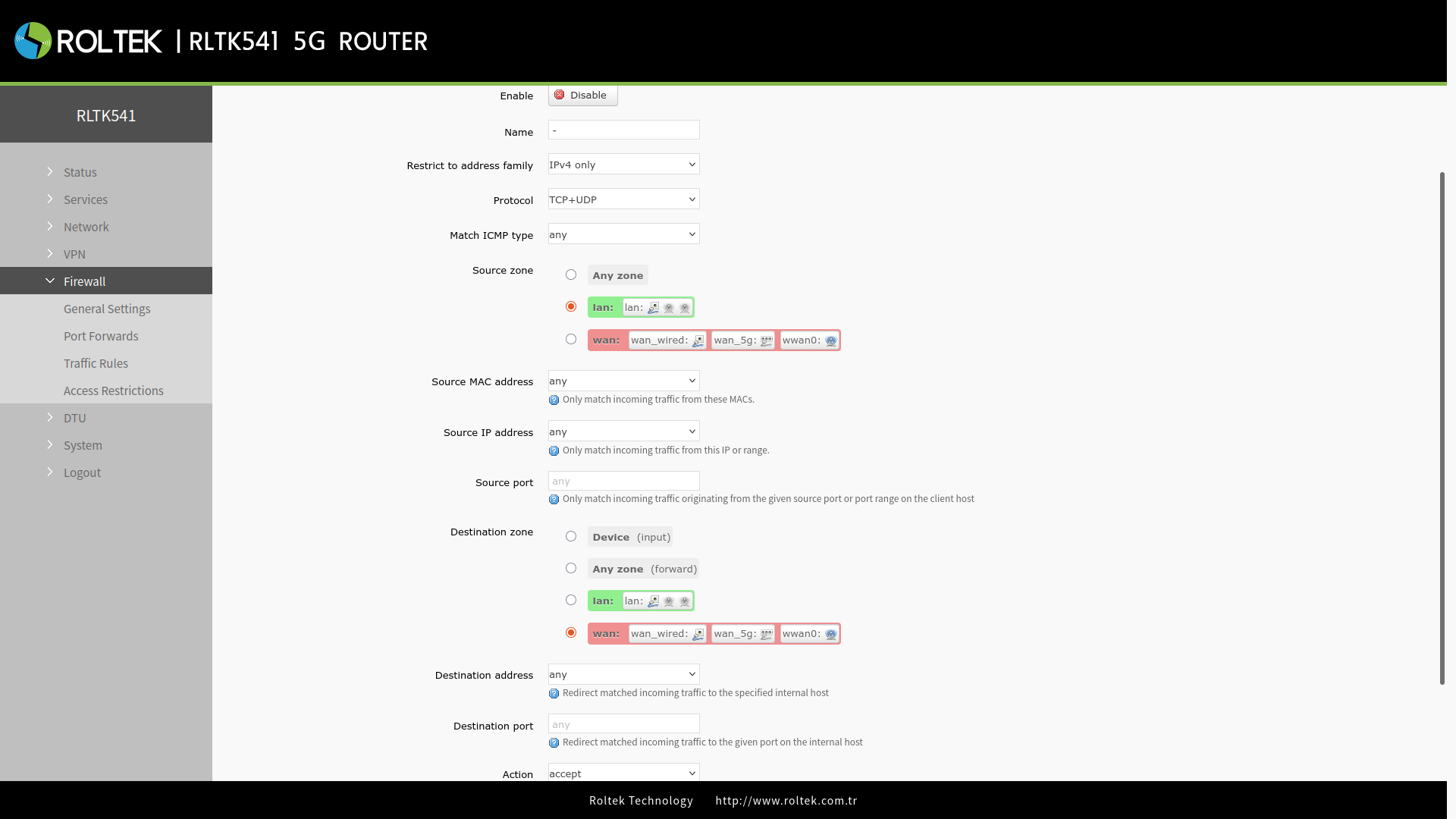
After making your settings, save your changes with the Save and Apply buttons.
| Parameter | Description | Default Value |
|---|---|---|
| Enable | Enable/Disable | Enable |
| Name | The name of the rule | - |
| Restrict to address family | Only IPv4 | Only IPv4 |
| Protocol | TCP+UDP/TCP/UDP/ICMP | TCP+UDP |
| Match ICMP type | Matching ICMP rule, match any. | Any |
| Source zone | Any zone/LAN/WAN | LAN |
| Source MAC address | The source MAC address that matches this rule, can be multiple MAC addresses. The MAC address is specified separated by spaces. The "Any" option matches all MAC addresses. Note: When matching the source MAC address, leave the source IP address blank. | Any zone |
| Source IP address | The source IP address that matches this rule, can be an IP range, for example, 192.168.1.100-192.168.1.200. The "Any" option matches all IP addresses. Note: When matching the source IP address, leave the source MAC address blank. | Any |
| Source port | The source IP port that matches this rule, can be a port range, for example, 8000-9000. The "Null" option matches all ports. | Null |
| Destination zone | Device/Any zone/LAN/WAN | WAN |
| Destination address | The target IP address to match. The "Any" option matches all IP addresses. | Any |
| Destination port | The target port to match. The "Null" option matches all ports. | Null |
| Action | You can choose what action to take after receiving this type of data packets: drop, accept, reject, don't track. | Accept |
Source NAT
Source NAT (SNAT) is a type of masking used to change the source address and/or port number of a packet to a static, user-defined value. SNAT is performed in the POSTROUTING section just before the packet leaves the device. Up to 100 SNAT rules can be added. These settings can be made under the Source NAT section on the page.
| Parameter | Description | Default Value |
|---|---|---|
| Name | The name of the rule, defined by the user. | None |
| Source zone | Matches traffic coming from the specified zone. | lan |
| Source zone | Matches traffic going to the specified zone. | wan |
| To source IP | Matches traffic going to the specified zone. | None |
| To source port | Matches traffic going to the specified zone. | None |
After making your settings, save your changes with the Save and Apply buttons.