Physical and Environmental Specifications
Physical Specifications
| Physical Characteristics | |
|---|---|
| Ingress Protection | IP30 |
| Case Material | Aluminum |
| Dimensions | 125.0 mm x 117.2 mm x 45.0 mm |
| Mounting | DIN Rail |
| Physical Interface | |
|---|---|
| DC Barrel Jack | 9 V – 36 V standard 5.5 x 2.1 mm round socket |
| WAN | 1x 10/100M, MDI, MDIX, 1.5kV electromagnetic isolated protection |
| LAN | 4x 10/100M, MDI, MDIX, 1.5kV electromagnetic isolated protection |
| Terminal Block | V+, V-: 9 V – 36 V input |
| Rx/A, Tx/B: RS232 / RS485 Communication | |
| GND: Input Ground | |
| DI1, DI2: 2x Digital Input | |
| DO1, DO2: 2x Digital Output | |
| COM: Output Common | |
| LED Indicators | Power, Wi-Fi, 2G/3G/4G, Signal Strength, Operation |
| SIM Card | 3 V/1.8 V SIM Card |
| Reload Button | Settings/Software Reset Button |
| Wi-Fi | 2x RP-SMA-K |
| Cellular | 2x SMA-K |
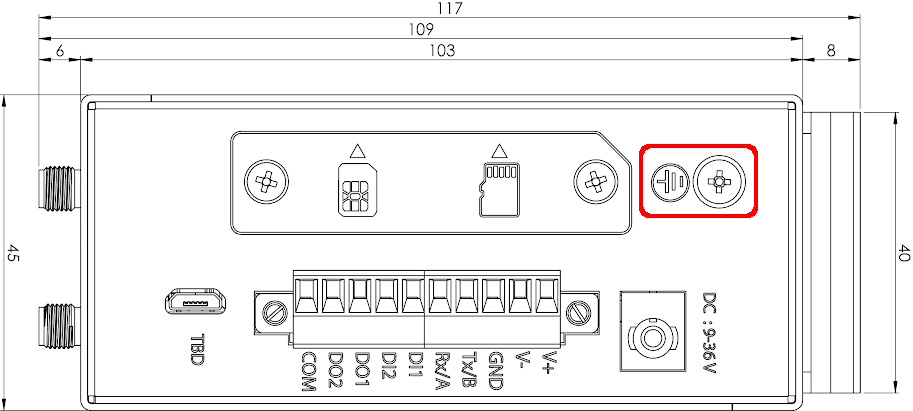
| Grounding Screw | It is recommended to connect the grounding wire to the grounding screw located on the product |
| TF Card | 1x TF Card Slot |
Grounding screw installation:
- Remove the grounding screw and place the grounding ring of the grounding wire onto the grounding screw,
- Tighten the grounding screw,
- Connect the grounding wire.
| LED Indicators | |
|---|---|
| PWR | Will light up if power is supplied |
| Work | The router will blink green when it is ready and functioning properly. |
| WLAN | The WLAN indicator will be on during normal operation. |
| USR | User defined. |
| NET | Red: Connected to 2G. Green: Connected to 3G. Orange: Connected to 4G. |
| Signal Strength | 1 Light: Low Signal 2 Lights: Medium Signal 3 Lights: High Signal |
Environmental Specifications
| Environmental Characteristics | ||
|---|---|---|
| Temperature | Operating Temperature | -20 ºC – +70 ºC |
| Storage Temperature | -40 ºC – +125 ºC | |
| Humidity | Operating Humidity | 5% – 95% |
| Storage Humidity | 1% – 95% | |